
For
Owners/admins and team members with the required code permissions.
Before you start
Select the exact lock in Operations. Source explains where the code is managed or what saved history is available.
Steps
Read status and source
Booking means a saved booking link is established. Manual means a saved manual origin is established. STRide Locks means a saved record is available without proven booking or manual origin. Observed only means the lock service lists the code but its saved origin/history is unavailable; it may have been created through STRide Locks. Managed outside STRide Locks means another app manages the code. Use Edit to change its name here; change its number or access times in the lock manufacturer’s app. Open About code sources for definitions.
Use Edit for any code
Choose Edit beside the code. The form always shows Name, Access code and Access. Codes managed in your lock maker’s app let you change the name here; their number and access times are read-only. Choose Change in lock app for short guidance. Review changes, then Confirm changes to save the name. This never takes over or reprograms that code.
Edit saved details
Choose Edit beside the code. Its current details are filled in and only that door starts selected. Change the name, PIN or access dates, then Review changes and Confirm changes. For codes already managed here, names are saved in STRide Locks without reprogramming the lock. Progress and confirmation update automatically, then return you to the refreshed list. Expand Other doors to update selected existing copies or add access to a new door. Unselected doors stay unchanged; each result is shown separately.
Delete only the intended code
Choose Delete on that row. Review its current name, PIN and lock. Confirm with Delete from lock for an observed code, or Confirm deletion for a saved code. Opening the review does not delete the code. Each review starts with Confirm deletion and Cancel. After you confirm, Sending removal appears while the request is submitted, then one Removing entry tracks that exact code until its removal is confirmed. Other pending removals do not submit this review. Slow confirmation stays in progress; you do not need to refresh or repeat Delete. Owners and admins can choose Stop and delete for a supported unfinished change; refreshing resumes its status checks.
Read automatic status updates
Code status updates automatically while this list is visible and when you return to the app. If an update is delayed, your last confirmed list and usual controls stay visible. A small notice appears below the list while checks continue. On the first load, Loading access codes appears until the list is ready. Short explanations appear beside unresolved codes. Other code records keeps read-only codes that the service reports as uninstalled in a closed reference section. Opening it does not change a code.
Example screen
Example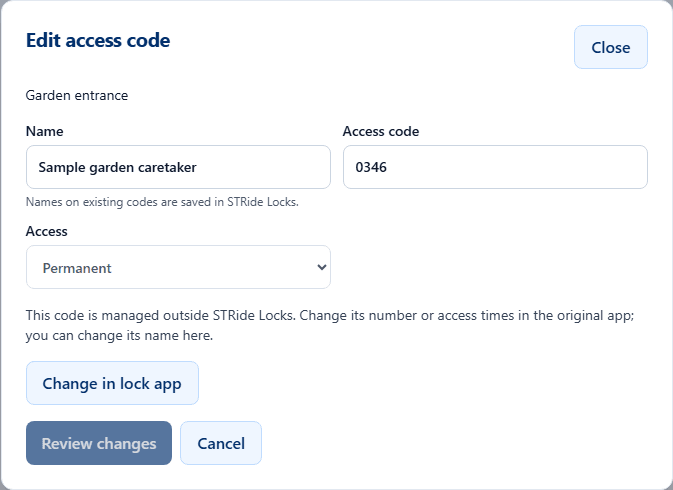
Phone review
Example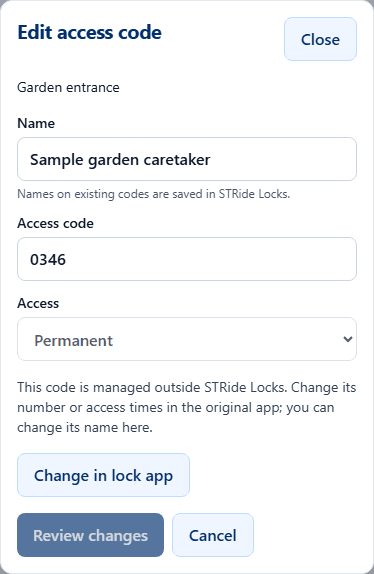
What to expect
Edits show a separate result for each selected door. Deletion keeps its brief confirmation message. A source label never establishes physical installation by itself.
If something does not look right
Needs attention means a code has a problem or its individual status needs review. Status updates automatically every 30 seconds while visible, and when you return. Active means the lock service confirmed installation and the current access window. Edit permissions are separate. Not listed means the current lock-service inventory does not include that exact saved code. It does not prove physical removal. Saved history is retained. Delete or Retry removal appears only after verification and still requires your review. A short status explanation appears beside unresolved codes. STRide Locks checks automatically without resending a failed request. The lock service may continue trying to install its managed code. Not on lock means the service explicitly reports an unset code. Settled, unmanaged read-only records appear under Other code records. Missing saved codes, pending changes and errors remain in the main list. Copying codes adds the selected codes and keeps existing codes unchanged.
Contact support