
For
Workspace owners and admins removing a code.
Before you start
First review and confirm the code removal in Operations.
Steps
Wait while Removing is shown
Removal has been requested, but it is not confirmed yet. STRide Locks keeps checking that exact entry.
Return whenever you need to
You do not need to press a check button. Checks pause while the page is hidden and resume when you return. Refreshing does not send another removal request.
Read the result
Removal confirmed means the lock service no longer lists that entry. If a check is delayed, checking continues automatically. If removal fails, review the entry before trying again.
Check removal status
STRide Locks checks the lock service automatically. Review the result before making another change. If a removed code is reported to still work, contact support; local assistance may be needed.
Example screen
Example
Phone progress
Example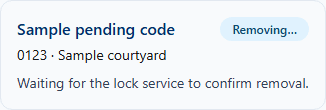
What to expect
Confirmation comes from the exact code record, rather than from its disappearing from a search or page.
If something does not look right
Keep another working way into the door. If the old number still works after confirmation, contact STRide Locks support with the door name and the time of your test.
Contact support